
Everything You Need to Know About Roku Devices
In an era where streaming entertainment has become the cornerstone of home leisure, Roku devices stand out as reliable gateways to a vast world of content. These compact players transform ordinary televisions into smart hubs, delivering everything from blockbuster movies to niche podcasts with remarkable ease. Whether you’re upgrading an aging set or outfitting a new living room, understanding Roku’s offerings empowers you to make informed choices that align with your viewing habits and budget. This guide delves into the essentials, equipping you with the knowledge to select, set up, and optimize a Roku device for seamless enjoyment.
Decoding the Roku Platform: A Foundation for Streaming Success
At its core, Roku represents more than just hardware; it’s a comprehensive ecosystem designed to simplify how we access digital media. Founded over a decade ago, Roku pioneered the concept of an open streaming platform, prioritizing user-friendly navigation over aggressive upselling. Unlike some competitors that tie you to specific ecosystems, Roku supports thousands of channels—ranging from premium services like Netflix and Disney+ to free ad-supported options through The Roku Channel. This neutrality fosters flexibility, allowing you to curate a personalized lineup without vendor lock-in.
What makes Roku particularly educational for newcomers is its emphasis on accessibility. The operating system, Roku OS, employs a tile-based interface that’s intuitive even for those less tech-savvy. Imagine scrolling through large, vibrant icons representing your favorite apps, with recommendations tailored to your watch history appearing subtly in the background. Roku’s commitment to regular software updates ensures that even older models receive enhancements, such as improved search algorithms or expanded voice controls, keeping your device relevant year after year.
For families or shared households, Roku’s multi-user profiles add a layer of organization. Each profile can maintain separate watchlists and parental controls, teaching users about digital boundaries in a practical way. By fostering an environment where content discovery feels effortless, Roku educates viewers on the breadth of available media, from international films to educational documentaries, all while minimizing frustration.
Navigating the 2025 Roku Lineup: Options for Every Screen Size and Style
Roku’s portfolio in 2025 has evolved to address diverse needs, from portable sticks for renters to robust players for home theaters. Each model builds on the platform’s strengths, varying primarily in resolution support, connectivity, and remote capabilities. To choose wisely, consider your television’s specifications—does it handle 4K? Do you prioritize portability over wired stability? Let’s break down the categories methodically.
Budget-Friendly Entrants: Starting Simple Without Sacrificing Quality
For those dipping their toes into streaming, entry-level devices like the Roku Express series offer an ideal introduction. The standard Roku Express supports up to 1080p HD resolution, making it perfect for older flatscreens that don’t demand ultra-high definition. Priced affordably, it connects via HDMI and relies on standard Wi-Fi for wireless streaming, teaching basic setup principles without overwhelming complexity.
Stepping up slightly, the Roku Express 4K introduces 4K Ultra HD capability at a modest cost, complete with HDR10 support for enhanced color and contrast. This model educates users on the benefits of future-proofing: even if your current TV isn’t 4K-ready, the device ensures compatibility with upcoming upgrades. Both Express variants come with a simple IR remote, emphasizing Roku’s philosophy that essential features—like quick app access and universal search—shouldn’t require premium pricing.
Versatile Sticks: Portability Meets Performance
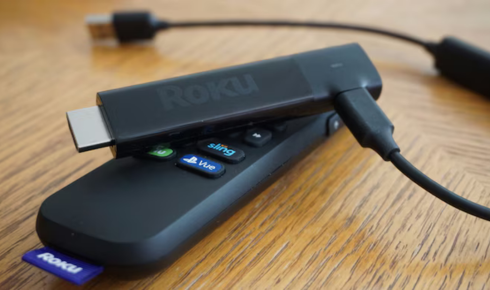
If mobility is key, Roku’s Streaming Stick lineup shines, designed to tuck discreetly behind your TV or travel in a backpack. The Roku Streaming Stick, refreshed for 2025, delivers crisp HD playback in an ultra-slim form factor—now powered directly from your TV’s USB port for clutter-free installation. Its long-range Wi-Fi receiver extends signal strength, a practical lesson in overcoming common connectivity hurdles in larger rooms.
For sharper visuals, the Roku Streaming Stick 4K elevates the experience with full 4K resolution, Dolby Vision, and HDR10+ formatting. This stick includes a voice-enabled remote with hands-free search, instructing users on natural language queries like “Find comedies from the 90s.” The newly launched Streaming Stick Plus variant refines this further, boasting a 35% slimmer profile and improved power efficiency, ideal for on-the-go setups. These sticks exemplify how compact design can enhance daily routines, turning any hotel room or secondary screen into a personal cinema.
High-End Powerhouses: For Discerning Audiophiles and Cinephiles
At the pinnacle sits the Roku Ultra, a powerhouse tailored for immersive home entertainment. Supporting 4K with advanced Dolby Vision, HDR10+, and even Dolby Atmos audio, it caters to setups with sound systems or premium displays. Ethernet connectivity ensures stable streaming during peak hours, while Wi-Fi 6 compatibility future-proofs against congested networks—a valuable tutorial on bandwidth management.
The Ultra’s Voice Remote Pro (second generation) incorporates backlit buttons, a rechargeable battery, and lost-remote finder functionality, teaching advanced customization like private headphone listening via Bluetooth. For those integrating audio further, Roku’s companion soundbars sync effortlessly, demonstrating how layered hardware amplifies the platform’s potential. Though pricier, the Ultra instructs on investing in longevity, with robust processing that handles multitasking, such as casting from mobile devices alongside live TV.
Essential Features That Elevate Everyday Streaming
Roku devices distinguish themselves through thoughtful inclusions that go beyond basic playback. Universal search aggregates content across services, surfacing options like a specific episode available for free on one app or rental on another— an educational tool for cost-conscious viewing. Voice integration with assistants like Alexa and Google Home allows commands such as “Play the news on Roku,” streamlining routines for busy households.
Screen mirroring and casting capabilities extend utility, enabling you to beam photos from your phone or mirror a laptop presentation directly to the TV. The Roku Mobile App serves as a secondary remote, complete with keyboard input for faster typing, which proves invaluable during setup or app navigation. Security features, including automatic updates and PIN-protected purchases, underscore Roku’s focus on user education around online safety.
In terms of content ecosystem, The Roku Channel stands as a free resource hub, offering ad-supported movies, originals, and over 200 live channels. This built-in library teaches the value of diverse programming, from fitness classes to international news, without additional subscriptions.
Mastering Setup: A Hands-On Tutorial for Flawless Integration
Setting up a Roku device is a straightforward process that reinforces foundational tech skills. Begin by plugging the player into your TV’s HDMI port—most models include a short cable for convenience. Power it on via the included adapter or TV USB, then select the input source on your remote. The on-screen prompts guide you through Wi-Fi selection; opt for 5GHz bands if available for optimal speed, a key lesson in network optimization.
Create or link a Roku account to access personalized recommendations and billing for paid content. This step introduces digital wallet management, ensuring seamless transactions. Once connected, download essential apps from the home screen grid—prioritize staples like YouTube or Hulu. For enhanced audio, pair Bluetooth headphones through the settings menu, a quick exercise in device pairing that builds confidence with wireless tech.
Calibration tools within Roku OS allow fine-tuning for your room’s lighting, adjusting brightness and color to match real-world conditions. This interactive feature educates on display optimization, preventing washed-out blacks or overly saturated hues.
Optimizing Navigation and Content Discovery
Once operational, leveraging Roku’s interface becomes second nature. The home screen’s customizable rows let you pin frequently used channels, while the “Featured” section highlights trending titles based on collective user data. To deepen engagement, explore the search function: input actors, genres, or moods to uncover hidden gems, fostering a habit of exploratory viewing.
Parental controls offer granular settings, from time limits to content ratings, instructing guardians on fostering safe media habits. Multi-device households benefit from guest modes, which provide temporary access without exposing personal profiles—a practical safeguard for visitors.
Resolving Glitches: Practical Troubleshooting Strategies
Even reliable systems encounter hiccups, but Roku’s diagnostics make resolution educational. If streaming buffers, restart the device by unplugging it for 10 seconds, a universal reset technique that clears temporary glitches. For Wi-Fi woes, reposition the player closer to your router or use a range extender, highlighting the importance of signal mapping in home networks.
Remote issues? Replace batteries or re-pair via the app if it’s a Bluetooth model. App crashes often stem from outdated software—enable auto-updates in settings to preempt this. For persistent problems, Roku’s built-in support chat within the device connects you to live assistance, turning troubleshooting into a learning opportunity rather than a chore.
Harmonizing Roku with Smart Home Dynamics
Roku’s interoperability extends to broader ecosystems, teaching connectivity’s power. Link it to smart lights for cinema-style dimming triggered by movie starts, or integrate with security cameras for monitoring via the TV screen. Voice routines, like “Alexa, movie night,” can launch Netflix and adjust ambiance, illustrating automation’s efficiency.
Apple AirPlay support on select models bridges iOS users, allowing effortless casting—a bridge between walled gardens. As smart homes proliferate, Roku positions itself as a central node, educating on unified control without proprietary silos.
Innovations Shaping Roku’s Horizon
Looking forward, Roku’s trajectory promises deeper personalization through AI-driven recommendations, analyzing viewing patterns to suggest not just shows, but viewing schedules around your routine. Enhanced spatial audio and 8K readiness hint at preparations for next-gen displays, while expanded smart home modules—like integrated doorbells—blur lines between entertainment and security.
Sustainability efforts, such as recyclable packaging and energy-efficient designs, reflect a commitment to responsible tech. For users, this evolution means devices that adapt intelligently, continually instructing on emerging trends like interactive live events or VR content previews. By staying attuned to these advancements, Roku owners can anticipate upgrades that keep their setups vibrant and relevant, ensuring streaming remains a source of joy and discovery for years to come.